Turn a public video link into text.
Paste a YouTube, TikTok, Instagram, X, or Facebook video link, then translate, summarize, edit, and export the transcript.
YouTube, TikTok, Instagram, X, and Facebook
The source language is detected automatically. Choose a target language only when you need a translated copy.
Turn a video link into text in three steps.
Paste a public video link
Use a supported public video link from YouTube, TikTok, Instagram, X, or Facebook.
Get the text
We transcribe the speech and translate it when you select a target language.
Review and download
Review the transcript, summary, and key points, then export what you need.
Transcription examples
These samples show the timed, editable result that follows a successful public-link transcription.
A conversation about creative work
Review a conversation and pick out the quotes you need.
What helps you start a new project?
I begin with one clear question,
then I listen to the people who will use it,
what do you do with their feedback?
I write down what they need,
test a small idea and improve it together.
These samples use AI-generated voices. The text and timestamps are the transcription service’s original output, including recognition errors.
From public video link to editable transcript.
Keep the original transcript, add an optional translation and AI notes, then edit or export the result.
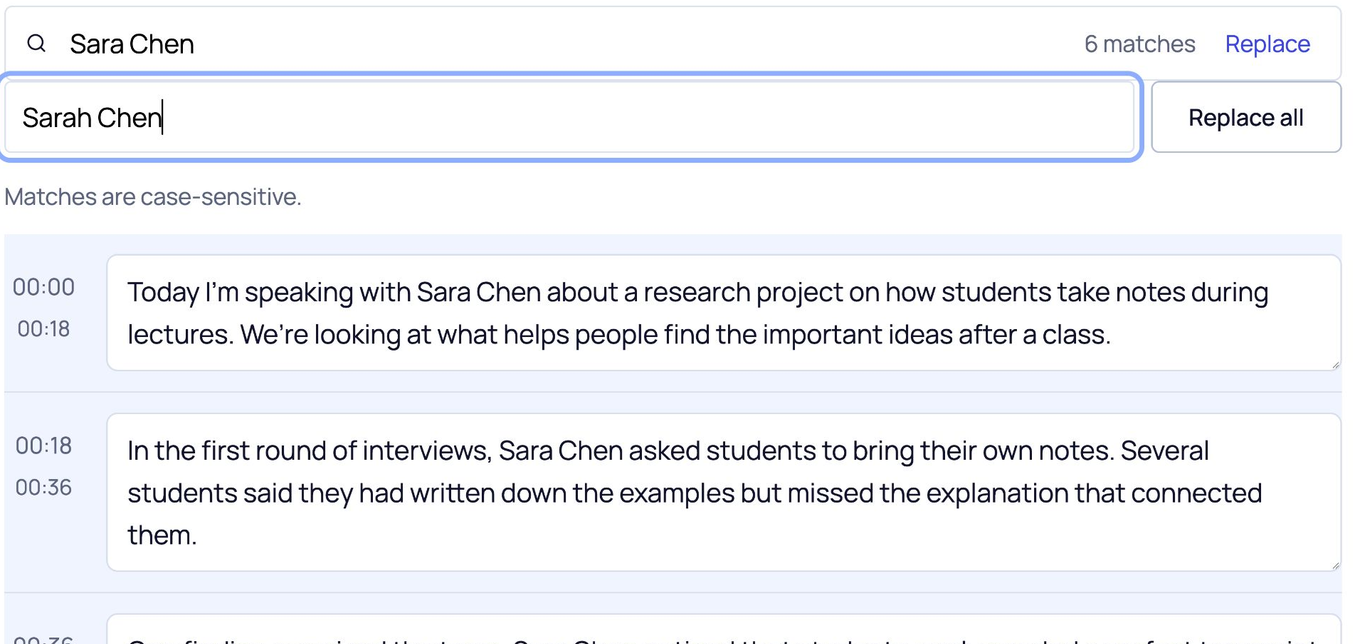
Correct repeated names
Watch all 6 instances of “Sara Chen” change to “Sarah Chen”.
Choose your export format
Download this page’s sample transcript to see the actual files.
These downloads use this page’s media sample. Save your name-correction practice from its own editor.
Some characters are not supported in PDF yet. Use DOCX if needed.
One link field for five video platforms.
Paste a public video URL from YouTube, TikTok, Instagram, X or Twitter, or Facebook. ScribeAny checks the source and requests a timed transcript.
TikTok and Instagram video posts
Paste a public TikTok video or Instagram post, reel, or video link.
X, Twitter, and Facebook video posts
Use a public X or Twitter status, Facebook video, reel, watch, share, or fb.watch link.
A recognized URL can still fail when the post is private, deleted, restricted, or unavailable to the transcription service.
Public video link questions.
Do I need an account?
No account is required to transcribe, translate, summarize, edit, copy, or download in this preview.
Which public video links can I use?
Use a public YouTube, TikTok, Instagram, X or Twitter, or Facebook video link. The link must match a supported video or post URL rather than a profile or feed page.
Does the video link need to be public?
Yes. The service must be able to open the video without access to a private account. Private, deleted, restricted, or unavailable posts can fail.
What happens when I submit a supported link?
ScribeAny requests available captions first and can ask the service to generate a transcript from the spoken audio when captions are unavailable and the media can be accessed.
Can I translate and summarize a linked video transcript?
Yes. The source language is detected automatically. You can request an editable translation, summary, and key points before starting, then review them against the transcript.
Can I edit and export the result?
Yes. Search and edit the transcript, replace repeated text, then export TXT, DOCX, PDF, SRT, VTT, or CSV from the result page.
What should I do when a video link returns no transcript?
Check that the post is public and still available. If you have the recording, use the video or audio upload page instead.
How do I keep my transcript and edits?
Download your transcript before refreshing or leaving this page. This preview keeps edits only in the current page and doesn’t provide an account library.
Have a public video link?
Paste the link to receive editable text, optional AI notes, and the export formats you need.