Convert audio to text online.
Upload an audio recording, then review, translate, summarize, and export the transcript.
MP3, M4A, WAV, MPEG, or OGG · Up to 100 MB in this preview
The source language is detected automatically. Choose a target language only when you need a translated copy.
Turn audio into text in three steps.
Add an audio recording
Upload an MP3, M4A, WAV, MPEG, or OGG audio file.
Get the text
We transcribe the speech and translate it when you select a target language.
Review and download
Review the transcript, summary, and key points, then export what you need.
Transcription examples
Compare an interview, lesson, or podcast recording with the transcript produced from it.
A conversation about creative work
Review a conversation and pick out the quotes you need.
What helps you start a new project?
I begin with one clear question,
then I listen to the people who will use it,
what do you do with their feedback?
I write down what they need,
test a small idea and improve it together.
These samples use AI-generated voices. The text and timestamps are the transcription service’s original output, including recognition errors.
Turn audio into text you can review and reuse.
Search the transcript, correct recognition mistakes, review the summary and key points, then export the result for your next task.
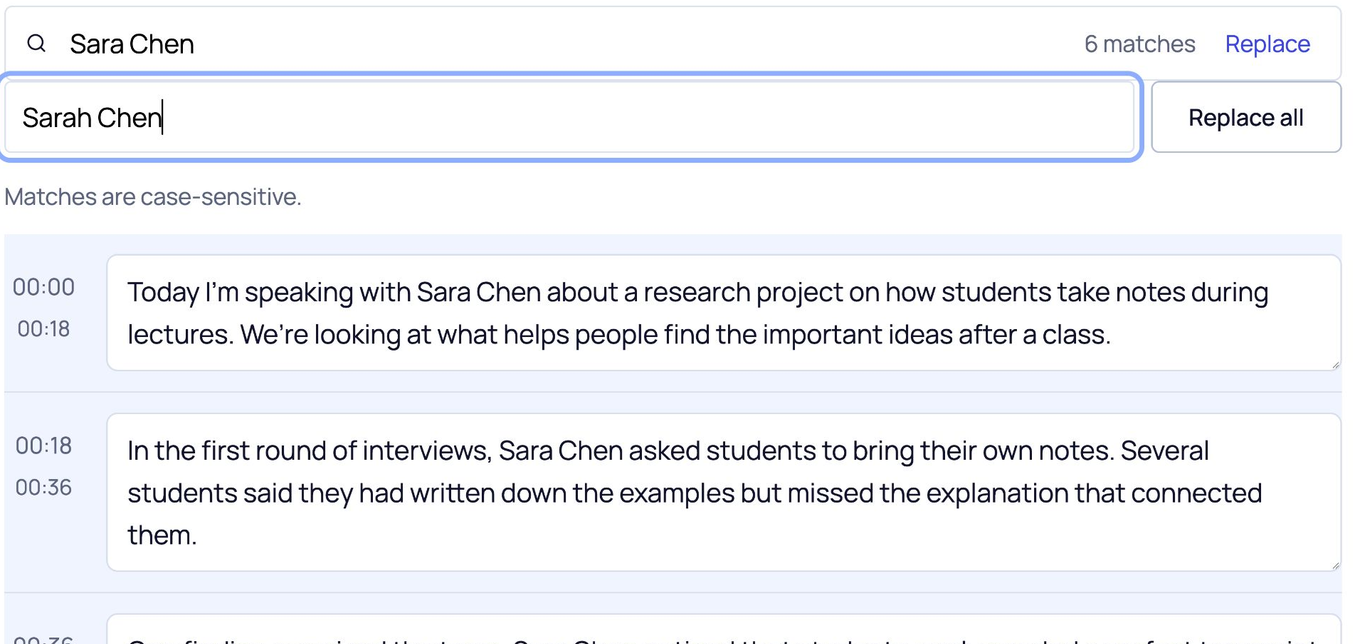
Correct repeated names
Watch all 6 instances of “Sara Chen” change to “Sarah Chen”.
Choose your export format
Download this page’s sample transcript to see the actual files.
These downloads use this page’s media sample. Save your name-correction practice from its own editor.
Some characters are not supported in PDF yet. Use DOCX if needed.
Choose an audio file that fits your recording.
Upload MP3, M4A, WAV, MPEG, or OGG. This preview accepts files up to 100 MB and detects the spoken language automatically.
MP3 recordings
Use an MP3 saved from an interview, podcast, lecture, or other spoken recording.
M4A voice recordings
Upload an M4A voice memo or phone recording without converting it to MP3 first.
WAV, MPEG, and OGG
Use one of these accepted audio formats when that is how your recorder or editor saved the file.
A file that uploads successfully can still return no transcript when it contains no clear speech.
Create an SRT subtitle file from audioAudio transcription questions.
Do I need an account?
No account is required to transcribe, translate, summarize, edit, copy, or download in this preview.
Which audio files can I upload?
Upload MP3, M4A, WAV, MPEG, or OGG files up to 100 MB in this preview.
How should I prepare an audio recording for transcription?
Use the clearest recording available. Background noise, echo, distant voices, and people speaking at the same time can increase recognition mistakes.
Can I translate an audio transcript?
Yes. The source language is detected automatically. Choose a target language before starting to keep the original transcript and generate an editable translation.
Can ScribeAny summarize an audio transcript?
Yes. Keep the summary option selected before starting, or generate an editable summary and key points from the result page. Review AI-generated notes against the transcript before using them.
Can I edit the transcript before downloading?
Yes. Edit the text directly, or search for a word or phrase and use Replace all to update matching text. Downloads use the text currently shown in your transcript.
Can I turn audio into SRT or VTT subtitles?
Yes. Export SRT or VTT to receive a separate timed text file. It does not contain the audio; use it with the original recording or a compatible video workflow.
How do I keep my transcript and edits?
Download your transcript before refreshing or leaving this page. This preview keeps edits only in the current page and doesn’t provide an account library. Uploaded files are sent to a transcription service for processing; this isn’t an offline tool.
Ready to turn audio into text?
Upload a recording to receive editable text, optional AI notes, and the export formats you need.