Turn the spoken audio in an MP4 into text.
Upload an MP4 video, check the words spoken in its audio track, and export a transcript or separate timed subtitle file.
MP4 only · Up to 100 MB in this preview
The source language is detected automatically. Choose a target language only when you need a translated copy.
Transcribe an MP4 in three steps.
Add your MP4 video
Choose an MP4 video from your device. You do not need to extract its audio first.
Get the text
We transcribe the speech and translate it when you select a target language.
Review and download
Review the transcript, summary, and key points, then export what you need.
MP4 transcription example
Play this MP4 interview and compare its spoken audio with the original timed transcript returned by the service.
A short product interview
Watch two speakers discuss a creative process and compare their words with the timed transcript.
What helps you start a new project?
I begin with one clear question.
Then I talk to the people who will use it.
What do you do with their feedback?
I write down what they need, test a small idea, and improve it step by step.
This AI-generated MP4 was submitted through the video upload flow. The transcript and timestamps shown here are the service’s original output, including any recognition errors.
Review your MP4 transcript and export subtitles.
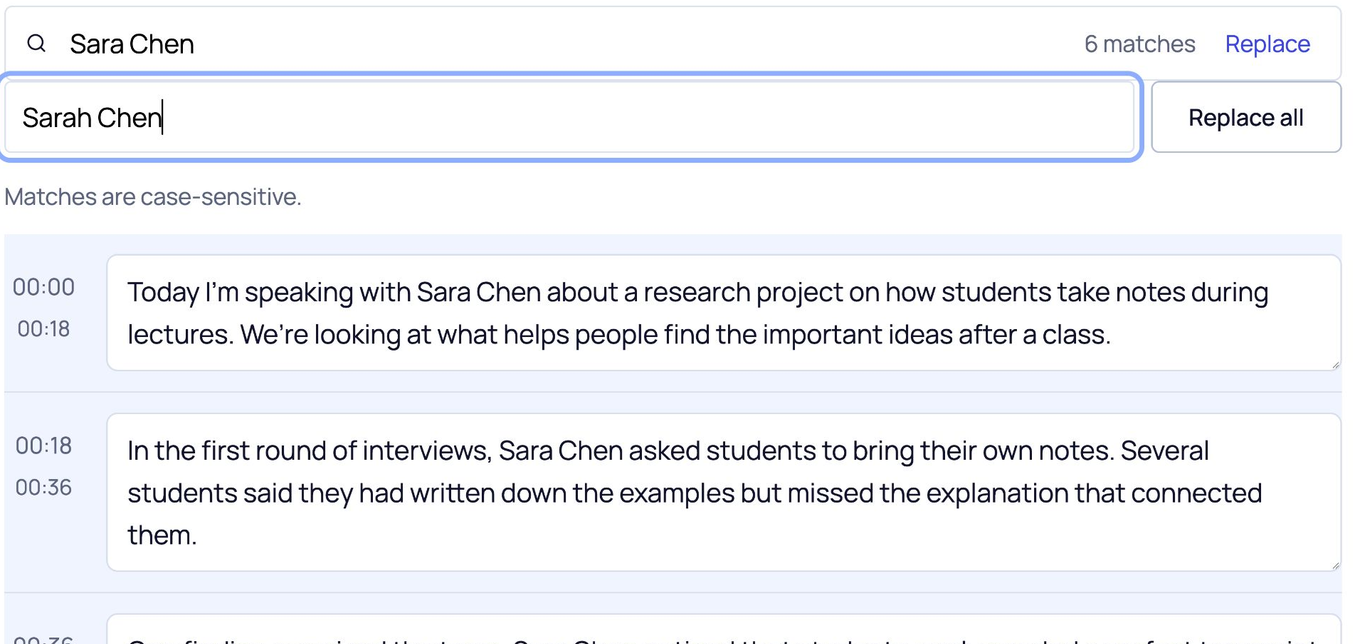
Check the speech in your video, correct a name or phrase, then save the transcript or a separate timed subtitle file.
Correct repeated names
Watch all 6 instances of “Sara Chen” change to “Sarah Chen”.
Choose your export format
Download this page’s sample transcript to see the actual files.
These downloads use this page’s media sample. Save your name-correction practice from its own editor.
Some characters are not supported in PDF yet. Use DOCX if needed.
Transcribe speech in an MP4 video.
Upload an interview, lecture, or screen recording saved as MP4. ScribeAny listens to the audio track; it does not read text that appears only in the picture.
Use the original video file
Choose an MP4 from your device. This preview accepts files up to 100 MB; you do not need to extract the audio first.
Keep subtitles separate
Export SRT or VTT with the returned timing. These text files do not contain the video or permanently add captions to it.
Have a different video format?
Use the video tool for MOV, M4V, MKV, WEBM, AVI, WMV, or QT files.
An MP4 can upload successfully but return no transcript when its audio track has no clear speech.
MP4 transcription questions.
Can I upload an MP4 without extracting its audio?
Yes. Upload the MP4 file directly. ScribeAny transcribes speech in its audio track; you do not need to make a separate audio file.
Does this read text that appears only on screen?
No. This is speech transcription, not video-frame OCR. Words that are only visible in the picture are not extracted.
What if my MP4 contains no clear speech?
The service may return no transcript. Try a video with audible speech or a clearer recording.
Do SRT or VTT downloads change my MP4?
No. They are separate timed text files for a compatible player or editor. ScribeAny does not burn subtitles into the video.
Can I correct the transcript before downloading?
Yes. Edit the text or replace a repeated term, then export the edited result.
How large can my MP4 be?
This preview accepts MP4 files up to 100 MB. The limit is checked before upload.
Have an MP4 video with spoken audio?
Upload the MP4, check the spoken words, and download a transcript or separate subtitle file.