Turn an MP3 recording into text.
Upload a saved MP3 recording, review the spoken words, and export the edited transcript or a timed subtitle file.
MP3 only · Up to 100 MB in this preview
The source language is detected automatically. Choose a target language only when you need a translated copy.
Transcribe an MP3 in three steps.
Add your MP3 file
Choose an MP3 recording from your device. No format conversion is needed.
Get the text
We transcribe the speech and translate it when you select a target language.
Review and download
Review the transcript, summary, and key points, then export what you need.
MP3 transcription example
Play this MP3 podcast sample and compare it with the original timed transcript returned by the service.
Making room for a good idea
Use the transcript as a starting point for show notes.
Welcome to the podcast, today we are talking about making room for a good idea, sometimes
the best thing you can do is take a short walk, leave your phone in your pocket, notice
what is around you, when you return, write down one thing you want to explore.
This AI-voiced MP3 was submitted through the audio upload flow. The text and timestamps shown here are the service’s original output, including any recognition errors.
Review, edit, and export your MP3 transcript.
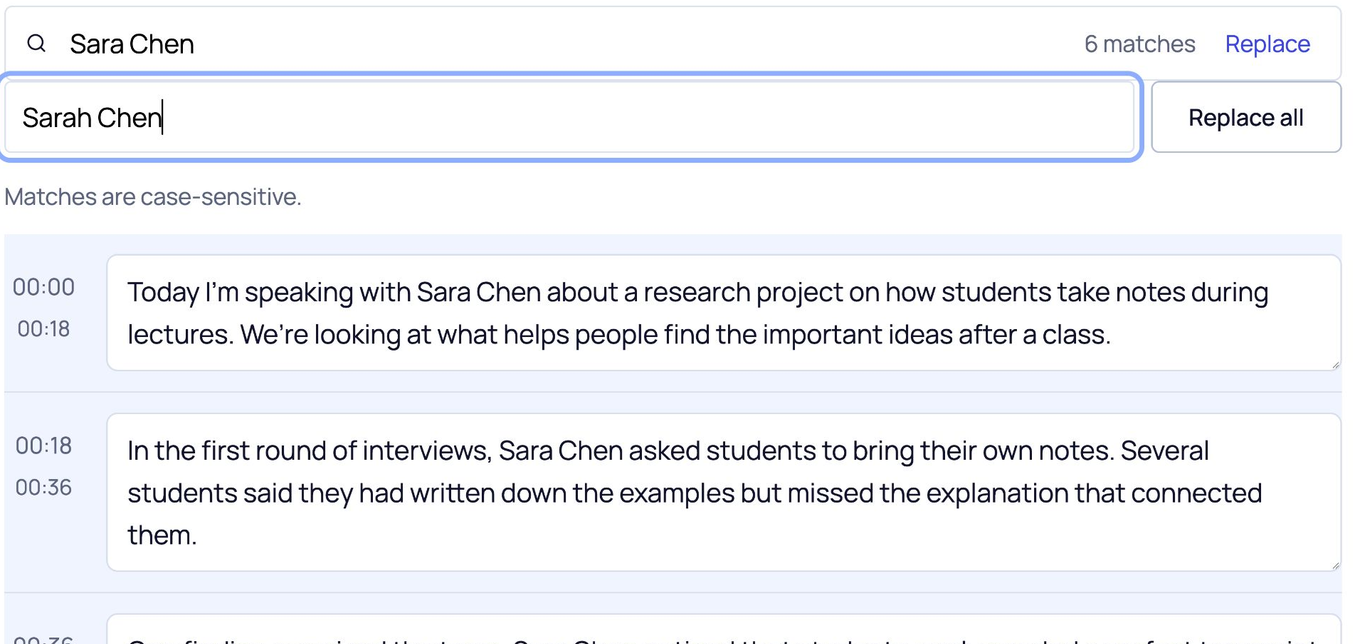
Search the spoken words, correct a name or phrase, then save the edited transcript as a document or timed text file.
Correct repeated names
Watch all 6 instances of “Sara Chen” change to “Sarah Chen”.
Choose your export format
Download this page’s sample transcript to see the actual files.
These downloads use this page’s media sample. Save your name-correction practice from its own editor.
Some characters are not supported in PDF yet. Use DOCX if needed.
Made for the MP3 file you already have.
Upload a saved interview, lesson, or podcast recording. ScribeAny turns its spoken audio into text you can review; you do not need to convert the MP3 first.
Upload the recording
Choose an MP3 from your device. This preview accepts files up to 100 MB and detects the spoken language automatically.
Check unclear speech
Compression, background noise, echo, and overlapping voices may affect the result. Compare names and details against your recording before exporting.
Have a different audio file?
Use the audio tool for M4A, WAV, MPEG, or OGG instead.
An MP3 can upload successfully but return no transcript if it has no clear speech.
MP3 transcription questions.
Can I upload an MP3 without converting it first?
Yes. Choose an MP3 file from your device or drop it into the tool. This preview accepts MP3 files up to 100 MB.
What if my MP3 recording is noisy or unclear?
Background noise, echo, distant voices, and overlapping speech can cause recognition mistakes. Use the clearest recording you have and review names, numbers, and terms against the audio.
Can I correct words in the MP3 transcript?
Yes. Edit a segment directly, search for a phrase, or use Replace all for a repeated word. Exported files use your edited text.
Can I download subtitles from an MP3?
Yes. SRT and VTT are separate files containing text and timing information. They do not include the audio or add subtitles to a video.
What if my MP3 has no clear speech?
The service may return no transcript. Try a recording with audible speech or a clearer version of the same recording.
How do I keep my MP3 transcript?
Download your transcript before leaving or refreshing this page. Edits remain in the current page only; this preview does not provide an account library.
Have an MP3 recording?
Upload the MP3, review the words, and download the result you need.