Turn an M4A recording into text.
Upload a saved M4A recording, review the spoken words, and export the transcript without first converting the file to MP3.
M4A only · Up to 100 MB in this preview
The source language is detected automatically. Choose a target language only when you need a translated copy.
Transcribe an M4A in three steps.
Add your M4A file
Choose an M4A recording from your device. No MP3 conversion is needed.
Get the text
We transcribe the speech and translate it when you select a target language.
Review and download
Review the transcript, summary, and key points, then export what you need.
M4A transcription example
Play this AAC-encoded M4A lesson and compare it with the original timed transcript returned by the service.
A short lesson on active listening
Read through a lesson and revisit its key ideas.
Today we are learning about active listening.
First, give the speaker your attention.
Second, pause before you respond.
Third, describe what you heard in your own words.
These small habits help us understand each other and ask better questions.
This AI-voiced lesson was encoded as AAC M4A and submitted through the audio upload flow. The text and timestamps shown here are the service’s original output, including any recognition errors.
Review, edit, and save your M4A transcript.
Turn a voice recording into text you can search, correct, and save as a document or timed text file.
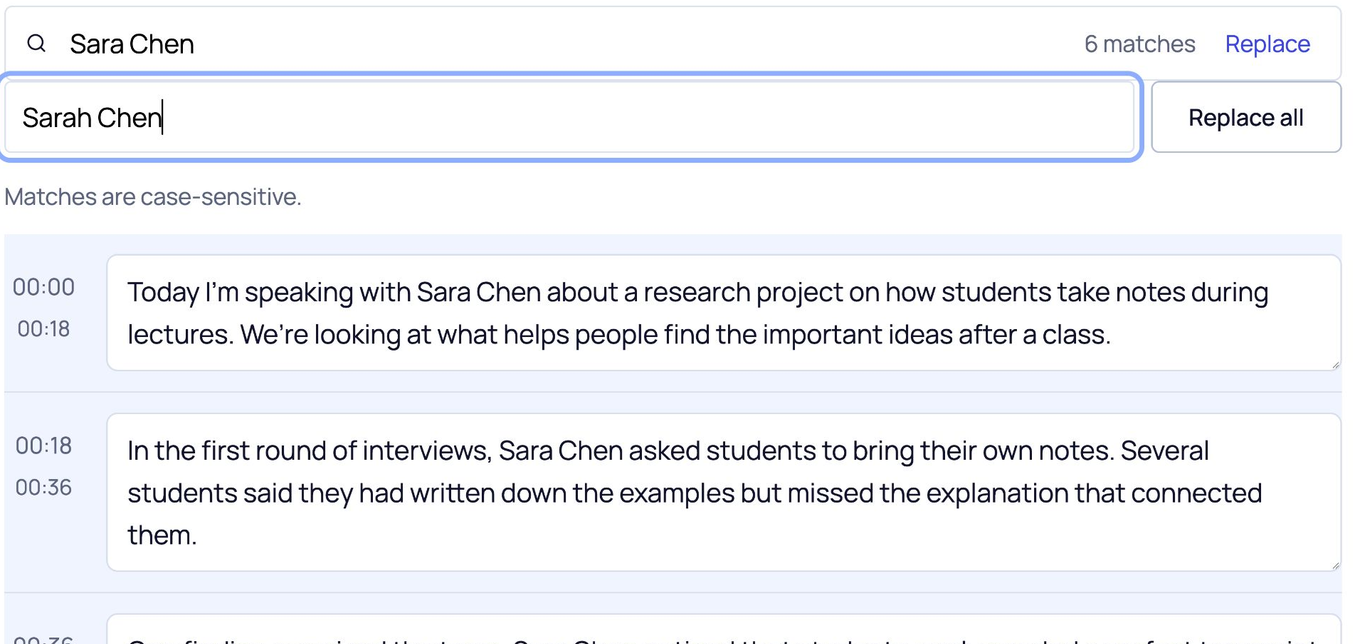
Correct repeated names
Watch all 6 instances of “Sara Chen” change to “Sarah Chen”.
Choose your export format
Download this page’s sample transcript to see the actual files.
These downloads use this page’s media sample. Save your name-correction practice from its own editor.
Some characters are not supported in PDF yet. Use DOCX if needed.
Upload the M4A you already saved.
Voice memos, lessons, and interviews are often saved as M4A. Choose the file directly, then review the timed text instead of converting it to MP3 first.
Use the saved audio file
Choose an M4A from your device. This preview accepts files up to 100 MB and detects the spoken language automatically.
Review how speech was divided
The service returns timed segments, which may differ from your original notes or intended paragraphs. Edit the words and punctuation before exporting.
Have another audio format?
Use the audio tool for MP3, WAV, MPEG, or OGG instead.
The example above is an AAC-encoded M4A made from an AI-voiced lesson, not a phone voice memo. Other device variants still need separate checks.
M4A transcription questions.
Can I upload an M4A voice memo directly?
Yes, if the saved file has an M4A extension. This preview was verified with an AAC-encoded M4A; other device or encoding variants may behave differently.
Do I need to convert M4A to MP3 first?
No. Choose the M4A file in the tool and ScribeAny sends it directly to the audio transcription service.
Why are the paragraphs or punctuation different from my notes?
The service returns timed speech segments, not the original layout of a note. You can edit each segment before copying or downloading the text.
What if a voice recording is quiet or noisy?
Low volume, echo, background noise, and overlapping voices can affect recognition. Use the clearest version available and review names and numbers against the recording.
How do I save my corrected M4A transcript?
Download TXT, DOCX, PDF, SRT, VTT, or CSV before leaving the page. The preview does not provide an account library.
How large can my M4A be?
This preview accepts M4A files up to 100 MB. The limit is checked before upload.
Have an M4A voice recording?
Upload the M4A, correct the words, and download a copy before you leave.